
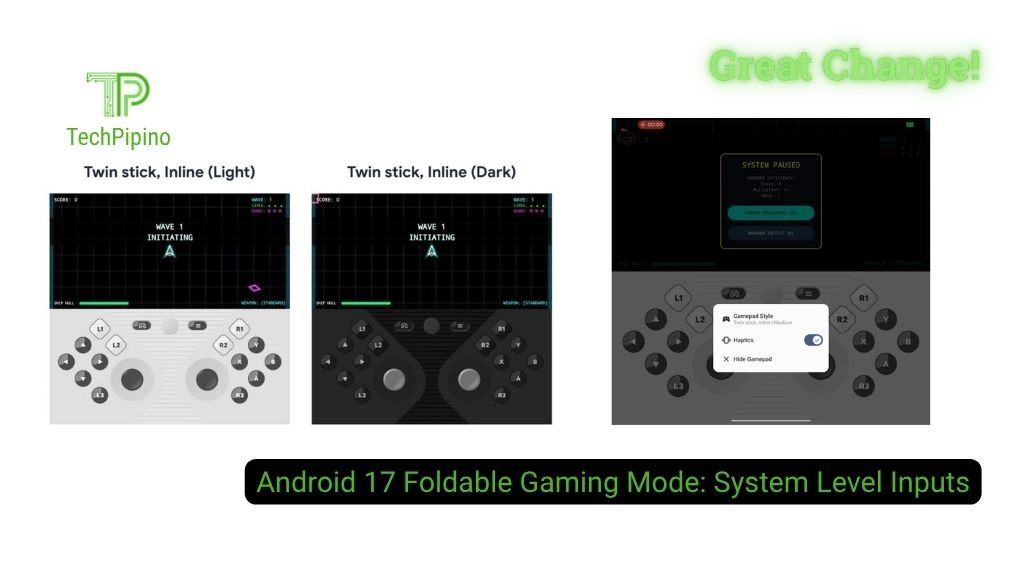
Google is expanding the utility of large-screen foldable devices in Android 17 with the introduction of a native Foldable Gaming Mode. By implementing virtual controller support at the system level, this feature addresses the ergonomics of tablet-sized displays during mobile gaming sessions.
The feature functions by splitting the screen area on an unfolded device. The upper half acts as the primary display for the game, while the bottom half hosts a fully customizable virtual gamepad. This configuration relies on the game being adaptive to aspect ratio changes, allowing the application to scale its rendering output to match the upper display area.
Operational Architecture and Input Mapping
Rather than relying on individual game developers to code support, Android 17 maps virtual inputs to standard controller protocols at the OS layer. This allows any game that currently supports physical Bluetooth or USB controllers to recognize the virtual gamepad automatically.
The system currently includes a comprehensive array of inputs:
- Directional Controls: D-pad and left/right thumbsticks.
- Action Buttons: A, B, X, Y.
- Shoulder and Trigger Inputs: L1, L2, L3, R1, R2, R3.
- System Navigation: Start button.
Google has integrated logic to detect external peripherals. If a user connects a physical controller via USB or Bluetooth, the virtual gamepad immediately hides to reclaim display space, ensuring the UI remains unobtrusive.
User Customization and Ergonomics
The current iteration of Foldable Gaming Mode provides modularity to accommodate different hand sizes and user preferences. The interface supports a staggered layout option, which aligns buttons in a more ergonomic configuration than a standard grid.
Buttons are adjustable across three distinct size profiles: Small, Medium, and Large. Furthermore, the mode includes native support for dark mode and a toggle for haptic feedback, allowing users to tune the tactile response to their preference. As this feature moves into the Android Open Source Project (AOSP) in the coming months, original equipment manufacturers will have the agency to build upon this foundation, potentially adding split-ratio adjustments or device-specific optimization profiles.
Technical Specifications Overview
| Parameter | Capability |
| System Integration | OS-level controller emulation |
| Input Support | D-pad, Analog sticks, A/B/X/Y, L1/L2/L3, R1/R2/R3, Start |
| Button Sizing | Small, Medium, Large |
| Peripheral Detection | Auto-hide on physical controller connection |
| Compatibility | Adaptive-display Android games |
Why It Matters
Mobile gaming on large, non-fixed surfaces often results in suboptimal ergonomics, as touch controls placed on the periphery of a large display can be difficult to reach. By dedicating the bottom half of a foldable screen to a persistent, customizable controller, Google is standardizing the handheld experience for large-screen devices. This reduces the barrier to entry for users who do not wish to carry external hardware but require the precision and familiarity of a traditional controller layout.
FAQ
Does this mode work with all Android games?
It requires games to support adaptive display scaling and standard controller input protocols to function correctly.
Can I adjust the size of the split-screen?
In the current pre-release state, the split is fixed at 50/50, though future iterations may allow for manual adjustments.
How does the system handle physical controllers?
The OS detects connected Bluetooth or USB controllers and automatically hides the virtual gamepad to free up screen real estate.
Will this feature be exclusive to Google hardware?
No, as it is becoming part of the Android Open Source Project, other manufacturers can integrate and customize it for their respective foldable devices.


