
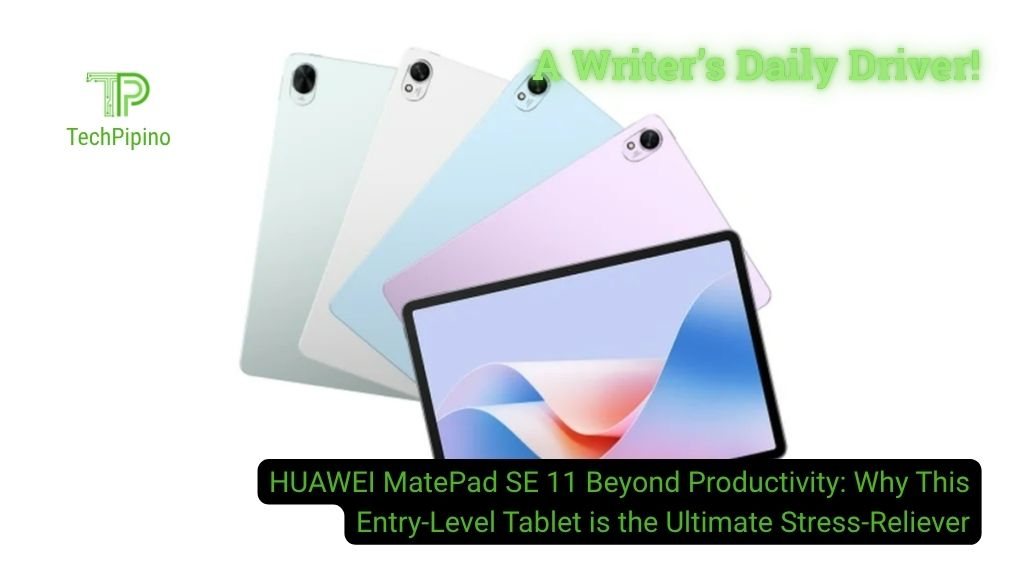
Productivity often defines the purpose of many tablets these days. Thanks to stylus pens, one can write, draw, and stretch on a digital screen for school or even office tasks. But for someone who bought the HUAWEI MatePad SE 11, there’s more to talk about besides those activities.
Instead of tasks, yours truly obtained this tablet to escape the world of stress and enter the nether realm of fantasy and imagination. Forget productivity and find out the unexplored quirks of this entry-level model in my lived experience.
More often than not, the MatePad SE 11 sits beside me on the couch while playing videos, browsing social media feeds, or loading browser games as I unwind after work.
Editorial context: This article is based on the author’s lived experience of using the tablet. It focuses on real-world usage rather than specifications or benchmarks, and presents both strengths and limitations across selected scenarios.
Dedicated Drama Pad: From AppGallery to the Couch
The massive 11-inch screen certainly offers a lot for binge watchers. Plus, the quad-speaker design lets you listen to those cringe dialogues and amazing sound effects as if you’re watching on TV.
In terms of visual quality, the tablet provides more than adequate from the 1200p resolution and LCD panel. While the blacks and colors can’t match most OLEDs, the large display makes up for it impressively.


This matters for users who prefer watching their fave shows on Eastern streaming platforms like Bilibili, iQiYi, and WeTV, all supported on the HUAWEI AppGallery. You can download and install other platforms for Android but either using the Aurora Store plus microG combo or GBox.
So, how impressive is the video experience? I can confirm that 4K works on iQiYi and WeTV. However, the difference when compared to 1080p is not so much because of the 1200p panel. The reason is the Kirin 910A chipset with limited support on that resolution.


Is YouTube usable? Absolutely! But 4K isn’t available. With Morphe, YT and YT Music just made my MatePad SE 11 a boredom killer during workdays and weekends.
| Major Upsides on Entertainment | Major Downsides on Entertainment |
| L1 widevine supported for 1080p and higher resolution playback, like 2K and 4K | 4K playable but seeking may result in stuttering |
| HUAWEI Histen 9.0 audio engine for level up listening experience on earphones | 1080p YT resolution cap; 4K playable on browser but expect UI stuttering |
| Wi-Fi 5 is stable without buffering or connection drops when streaming | PC-level full-screen playback mode; expect black borders |
For fans of BL/GL series, especially from Thailand, I recommend this device for maximum immersion at a reasonable price without unpacking a laptop. Watch on the pad and join the trends on X with your phone.
LTPO vs LTPS Display: Differences, Battery Impact, and Which Is Better
Two Feeds, One Screen, Unhinged Thoughts
Love browsing social media apps? Good, because this device levels that up. Why browse on one at a time if you can do it on two?
Although it’s weird opening both Facebook and Instagram simultaneously, the MatePad SE 11 allows side-by-side viewing experience in landscape mode. Scroll yourself to feedland doomsday left and right.


If you want to dial down a notch, try TikTok and a Meta app. Watching someone’s stream while browsing another app because I couldn’t understand their language makes this combo feel more sane to me. But each one to their own.
| Major Upsides on Social Media | Major Downsides on Social Media |
| Full versions of Meta apps, TikTok, and many others work normally. | Meta apps and others need Aurora Store, microG, or GBox. TikTok, Bigo Live, and more are native on the AppGallery. |
| 3 social media apps at the same time. With Multi-Window enabled, you can place 2 apps side by side and another 1 in a small window. Also works on YT. | No X support. Use a browser instead. |
| Simultaneous video playback on 2 active social media apps. | No HDR; affects both Instagram and YouTube. |
TikTok Dual-Screen, Simultaneous Playback
Among my experiments, TikTok allows dual-screen use if you trigger it correctly. It lets you join a livestream and watch your daily feeds. To do this, use the search bar and find the creator doing the live. In the results, tap on the preview of that live and it’ll launch on the right side. Tap the back button to return to your FYP, Following, and other tabs.

If your FYP shows another livestream, you can watch it without participating. But if you join in, it replaces the left side. So, watching two livestreams works with certain limits.
So, if you’re the type who follows your favorite artists or content creators by calendar, the tablet accommodates such multitasking when needed. Very applicable when all your other devices are charging or unavailable.
Unlocking the MatePad’s Hidden Gaming Quirks
As a gamer of the 90s, this is by far my most loved quirk of the MatePad SE 11. But don’t get too excited because there’s no way the device can handle AAA high-octane titles. At least, not for long even if they load.
Yours truly personally tested this on two websites: BoardGameArena.com and itch.io. The last one may ring a bell.
BoardGameArena.com is a website designed for browser co-op gaming. During my weekly sessions with friends, the M-Pen Lite plays a big role as the mouse. With Vivaldi as my main browser, tap full screen and scroll with the stylus and game my way without opening my laptop. The 7700 mAh handled four hours of play time.

Next is a realm of numerous indie games: itch.io. With a browser, easily access and enjoy those new releases. If you’re a fan of horror titles or visual novels, this device would serve you well on this site.


Feeling frisky? Make sure no one’s around to see what you’re gawking at. That same site also hosts NSFW titles, many of which are downloadable right on the tablet. It’s a good way to test games before you buy full versions or new chapters.
| Major Upsides on Gaming | Major Downsides on Gaming |
| Stronger impact for visual novels and horror games | Demanding titles aren’t stable or playable |
| Most browser games are smooth and supported | AppGallery’s GameCenter is good for no-download gaming but plagued by ads. |
| Cutscenes play normally under the right conditions | Cutscenes with 3D assets may stutter at the start but once fully loaded, the loop is smooth. |
Gaming isn’t a strength of the MatePad SE 11 and yet it shows hidden potential in this category. So long as you know what you’re looking for and where to find them.
Serious Value for Unserious Content
In my experience, the HUAWEI MatePad SE 11 is undervalued in entertainment. There’s no denying that it’s a capable unit for creative and productivity tasks. However, it deserves much appreciation in its ability to relieve stress through immersive playback, multiplayer fun, and a bit of naughtiness on the side.

Already have a HUAWEI phone? Got no problems with the lack of Google services and wanted to explore a new ecosystem? This pad is a good start for that purpose without hurting your wallet. Consider it as a stepping stone before going to the more expensive MatePad series.
HUAWEI MatePad SE 11 is sold at a retail price of PHP 12,899 in the Philippines with 8+128 GB, available in LTE and Wi-Fi variants.
HUAWEI MatePad SE 11 Specifications
| Display Panel | 11” 1920 × 1200, 207 ppi, TFT LCD |
| Processor | Kirin 710A |
| Memory & storage | 4/6/8+128 GB |
| Battery & charging | 7700mAh typical, 22.5w, USB-C 2.0 |
| Cameras | 8MP rear + 5 MP front |
| Networks | Wi-Fi 5, 4G LTE (mobile variant) |
| Audio | 1 microphone, 4 speakers, HUAWEI Histen 9 |
Quick Answers on the HUAWEI MatePad SE 11
What’s included in the box?
The HUAWEI MatePad SE 11, a HUAWEI SuperCharge brick, a USB-C cable, warranty paper, and user manual. The HUAWEI M-Pen Lite and folio cover come with the Wi-Fi only version of the device at the time of purchase
Does the stylus need Bluetooth and a battery to work?
The M-Pen Lite doesn’t need Bluetooth to work on the tablet. But it needs a AAAA (quadruple A4) dry cell battery. In standby mode, it lasts up to one year. A red-colored rubber cork is found inside the pen’s spring. Unscrew the cap and remove the cork to use the pen. Not only does this cork prevent the spring from warping and bending, it also stops it from connecting to the battery. That further extends battery life. Always replace the cork after using the pen.
Does the folio cover allow the tablet to stand?
Yes. The provided folio cover can be folded so the tablet can stand in landscape mode.


